Amazon Advertising offers a service to help businesses effectively connect with and captivate their customers through online platforms provided by Amazon. By leveraging Amazon Advertising, you have the power to create and manage campaigns that showcase your products or services on platforms like Amazon.com, Fire TV, Kindle, IMDb, and numerous partner sites and apps. Moreover, Amazon Advertising provides you with tools to measure performance, optimize results, target your desired audience precisely, and gain insights through analytics. Whether your goal is to enhance brand recognition drive sales figures or foster customer loyalty Amazon Advertising serves as a partner in achieving these objectives The Amazon advertising dashboard presents an array of options for ads while also offering optimization techniques to maximize their effectiveness.
What Is Amazon Advertising?
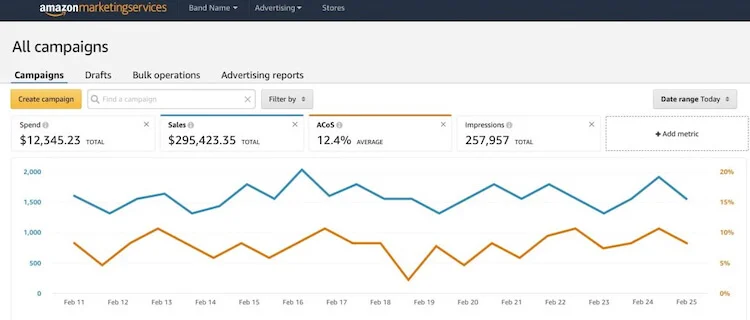
Amazon advertising is a range of product offerings available for all registered sellers, vendors, authors, app developers, and agencies. It is a service that enables businesses to effectively promote their products and brands through Amazon’s platforms. It offers a range of solutions including sponsored ads, display ads, video ads, audio ads and stores. The display, video, and audio inventory is bought programmatically through Amazon DSP advertising for brands, which reaches shoppers away from the search results page. These solutions play a role in helping businesses connect with their desired audiences, enhance visibility and boost sales. These solutions help businesses reach their target audiences, increase their visibility, and drive sales. Amazon Advertising also provides tools and insights to help businesses measure and optimize their advertising performance.
Benefits of Advertising on Amazon
Advertising on Amazon is a powerful way to reach millions of potential customers who are searching for products or services like yours. There are many benefits of advertising on Amazon, including:
Increased Visibility for Products
Amazon’s advertising options give you the opportunity to reach new shoppers. This can also increase brand discoverability.
Potential Boost to Organic Amazon Rankings
Amazon pay-per-click ads not only help generate visibility for products, but also drive traffic to your listings, increasing your Amazon rankings.
Cost-Effectiveness Compared to Other Advertising Platforms
Because Amazon has first party sales data rather than third party, Amazon ads cost less than both Google ads and Facebook ads.
Different Types of Amazon Ads
Amazon offers various types of ads to help sellers and brands reach their target audience and increase their sales. You should pick a combination of Amazon’s many advertising offerings for the best advertising strategy. Some of the most common types of Amazon ads are:
Sponsored Products
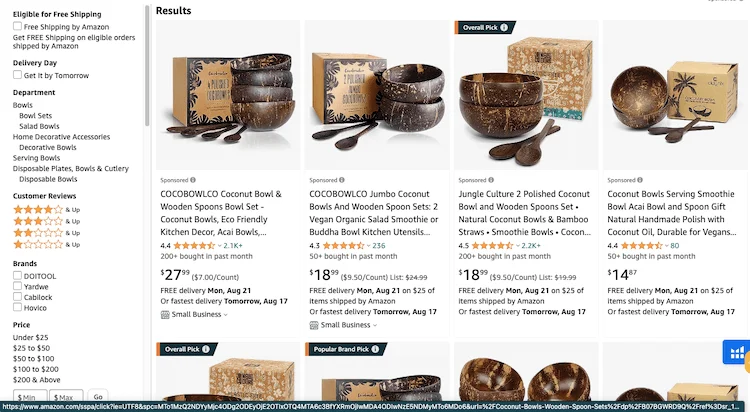
These cost-per-click ads for individual listings appear in both shopping results and on product detail pages. They help drive traffic to a specific product listing and boost its visibility.
Headline Search Ads
Similar to sponsored products, headline search ads appear as a top banner on Amazon search pages. Headline Search Ads allow advertisers to create custom headlines, choose up to three products to display, and target relevant keywords. Advertisers only pay when shoppers click on their ads, and they can track their performance using detailed reports.
Amazon Sponsored Brands
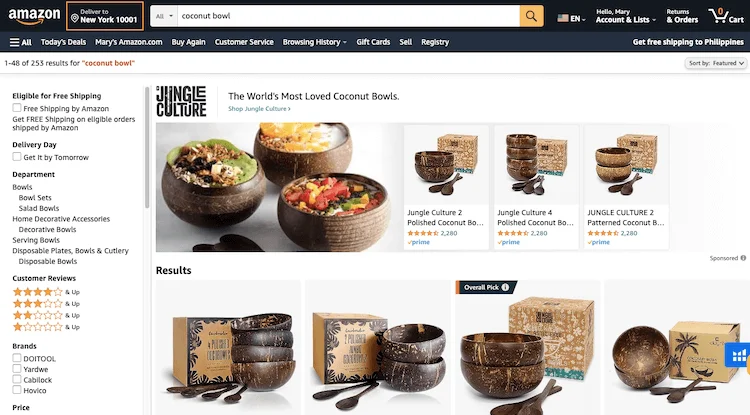
These ads feature custom headlines and brand logos across multiple products, appearing in shopping results. These are banner ads that appear on the top, bottom, or side of the search results page. They help increase brand awareness and showcase multiple products or a custom message.
Amazon Sponsored Display Ads
These ads are targeted to relevant shoppers based on previous Amazon shopping interests. These are display ads that appear on Amazon and other websites and apps. They help retarget shoppers who have viewed or purchased similar products, or target shoppers based on their interests or demographics.
Amazon DSP (Demand-Side Platform)
This program allows advertisers to buy a combination of display, video, and audio ads on Amazon and other publishers. It helps reach a large and diverse audience across the web and measure the impact of the campaigns.
Video Ads
These ads appear in places like publisher channels and networks, connected TVs, and IMDB. You can choose from different formats, such as in-stream, out-stream, or video banner ads, and optimize your campaign performance with detailed analytics and reporting tools.
Custom Ads
Amazon Custom Ads is a service that enables you to craft ads that are personalized and highly relevant to your customers. It’s all about tailoring an advertising solution that perfectly aligns with your needs. With access to Amazon’s wealth of data and insights you can precisely target your audience based on their interests, preferences and behavior. Additionally, you have the freedom to customize the appearance of your ads so they seamlessly blend with your brand identity and website design. By leveraging Amazon Custom Ads you’ll be able to enhance conversions, foster loyalty and improve customer retention rates through a customer experience.
Amazon Additional Advertising Solutions
Amazon offers additional advertising solutions that help advertisers reach more customers and grow their businesses on Amazon. Other Amazon advertising solutions include:
Lockscreen Ads
Amazon Lockscreen Ads appear on phones with the Amazon app installed. These ads appear on the device’s lockscreen and can drive traffic to your product page, website, or app. You can target your ads by device type, genre, or interest to reach your ideal audience. Amazon Lockscreen Ads are easy to create and manage with the Amazon Advertising console.
Amazon Live
These are livestreams to advertise your product or brand. With Amazon Live Ads, you can create engaging live video streams that feature your products and interact with customers in real time. You can also use interactive features such as chat, polls, and coupons to drive sales and loyalty.
Amazon Stores
For no extra cost, feature your store of products on Amazon’s website. You can design your own store with rich media, custom layouts, and multiple pages. You can also measure your store’s performance with detailed analytics and insights. Amazon Stores Ads are easy to set up, manage, and optimize.
Amazon Attribution
This measures how ads outside of Amazon drive results on Amazon. You can track conversions, revenue, and return on ad spend (ROAS) for your ads across different channels and platforms, such as social media, search engines, display networks, and video streaming services. Hence, you can optimize your marketing strategy and budget to reach more customers and drive more sales on Amazon.
Getting Started with Amazon Ads
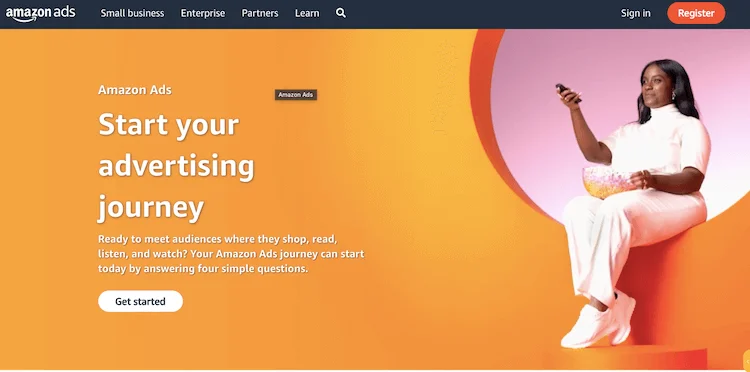
Amazon Ads provides a solution to connect with a customer base actively seeking products or services similar to what you offer. Whether your aim is to enhance brand visibility, attract visitors to your website or boost sales numbers Amazon Ads can effectively assist in accomplishing these objectives. Getting started with Amazon ads is simple. Below are the steps that will show you how to create and manage your first campaign on Amazon Ads, and how to optimize it for the best results.
Sign-up Process and Account Options
Amazon will walk existing sellers and vendors through setting up sponsored ads. Non-Amazon sellers wishing to use Amazon ads to promote their products can set up an account and utilize a combination of their advertising options.
Setting Up Ad Campaigns
On the left of the Amazon advertising console is an option for Campaigns. From here, you can select the advertising options that work best for you.
Tips for Optimizing Amazon Ads
To get the most out of your advertising budget, you need to optimize your campaigns and follow some best practices. Here are some tips for optimizing Amazon ads:
Use relevant keywords and match types
Keywords are the words or phrases that trigger your ads when someone searches for them on Amazon. You can choose from three match types: broad, phrase, and exact. Broad match keywords will show your ads for any search that is related or similar to your keyword, while phrase match keywords will show your ads for searches that include your keyword in the exact order, with or without additional words before or after. Exact match keywords will show your ads only for searches that match your keyword exactly. Depending on your goals and budget, you can use different match types to target different levels of search intent and competition.
Optimize your bids and budgets
Bids represent the amount you’re willing to pay for each click on your ad while budgets indicate the amount you’re ready to spend on each campaign or ad group per day. You can use automatic or manual bidding strategies to optimize your bids and budgets. With automatic bidding, Amazon adjusts your bids based on the likelihood of a conversion. Whereas with manual bidding, you have control over setting your own bids for each keyword or ad group. Additionally bid adjustments allow you to increase or decrease your bids depending on factors such, as device type, time of day or ad placement.
Monitor and analyze your performance
To optimize your Amazon ads, you need to track and measure how they are performing and identify areas for improvement. You have the option to utilize the reports and metrics provided in the Amazon Advertising console for tracking and evaluating your performance. It’s important to focus on metrics such as impressions, clicks, click through rate (CTR), cost per click (CPC) conversions, conversion rate (CVR) and return on ad spend (ROAS). Additionally you can leverage tools like Amazon Attribution or Amazon Brand Analytics to assess how your ads are generating traffic and sales, across channels and platforms.
Test and optimize your creatives
Creatives are the elements of your ads that users see, such as headlines, images, descriptions, or ratings. To optimize your creatives, you need to test different variations and see which ones perform better. You can use tools such as Amazon A/B Testing or Amazon Sponsored Display Creative Builder to create and test different creatives for your ads. You can also use best practices such as using clear and compelling headlines, high-quality images, relevant and concise descriptions, and social proof to improve your creatives.
Writing Compelling and Urgent Ad Copy
The text copy for your ads should be tight, informative, and adequately convincing. Be specific both in the advertising copy to give an accurate description of your product. Additionally, target the correct audiences with the types of ads you use for the best results.
Utilizing Product Targeting and Negative Keywords
Amazon offers product targeting to put your product in front of shoppers browsing similar products. Additionally, smart use of negative keywords keeps your product from showing up in irrelevant searches or on pages with products that might outperform yours.
Sponsored Products vs Sponsored Display: Which Format Fits Your Goal?
Sponsored Products and Sponsored Display are the two ad types sellers mix up most often. The choice comes down to where the shopper is in the buying journey. Sponsored Products reach shoppers who are already searching to buy, while Sponsored Display reaches them earlier, including while they browse away from Amazon.
| Feature | Sponsored Products | Sponsored Display |
| Main goal | Direct sales of individual listings | Awareness, consideration and retargeting |
| Targeting | Keywords and products | Audiences, products and categories |
| Placements | Search results, product detail pages, select Amazon and third-party sites | Homepage, search results, product detail pages, Twitch, IMDb, third-party apps and sites |
| Pricing | CPC, with bids set per keyword | CPC (conversions or page visits) or vCPM (viewable impressions), with bids adjusted by Amazon |
| Who can use it | Professional sellers, vendors, book vendors, KDP authors, agencies | Brand-registered sellers, vendors, agencies, and non-Amazon sellers in beta |
| Shopper stage | Actively searching to buy | Earlier in the buying journey |
How Each Format Is Targeted
Sponsored Products run on keywords and product targeting. You choose the search terms or ASINs you want to appear against, manually or through automatic targeting, and set a bid for each one. Sponsored Display does not use keywords at all. Instead, you choose an audience, such as shoppers who viewed your product or similar ones, or people with related interests, or a set of products and categories to appear alongside.
Bidding and Optimization Goals
With Sponsored Products, you set the bid for each keyword and pay only when a shopper clicks. With Sponsored Display, you choose an optimization goal and Amazon adjusts your bids in real time to reach it. You can optimize for conversions or page visits, both charged per click, or for viewable impressions, charged per thousand viewable impressions (vCPM). The vCPM option suits pure awareness campaigns, while the conversions goal is the better fit when sales are the priority.
Eligibility and When Ads Stop Running
Sponsored Products are open to professional sellers, vendors, book vendors, KDP authors and agencies, as long as the product is in an eligible category and can win the Featured Offer. Adult products, used or refurbished items and products in restricted categories cannot be advertised. Sponsored Display requires Brand Registry for sellers, while vendors and agencies can also use it, and businesses that don’t sell on Amazon can use it in beta to send traffic to their own websites.
Both formats pause automatically when a product goes out of stock or loses the Buy Box. This protects your budget, but it also means unstable inventory or pricing can switch off a campaign that was performing well, so keep stock and prices steady on the ASINs you advertise.
Budgets and Minimum Spend
There is no minimum spend for any sponsored ad type. Sponsored Products and Sponsored Display run on a daily budget that you can raise or lower at any time. Sponsored Brands also let you set a budget for the whole campaign, but once a campaign budget is set it can only be increased, not reduced.
Using Both Formats Together
The two formats work best as a pair rather than as alternatives. Start with Sponsored Products to capture high-intent searches and find out which products convert. Once a product performs well there, add Sponsored Display to retarget shoppers who viewed it but didn’t buy. Expect lower conversion rates from Sponsored Display, because these shoppers are earlier in their journey.
How to Structure Your Amazon Ad Campaigns
A clear campaign structure makes it much easier to control budgets and bids and to see what is actually working. Amazon sellers typically see around 14% of PPC-driven sessions turn into sales, and a well-organized account is what shows you which campaigns contribute to that figure and which ones only spend.
Campaigns, Ad Groups and Keywords
An Amazon ad account is built in three layers. At the campaign level, you set the goal (sales, awareness or a product launch), the daily budget and the targeting type, automatic or manual. Ad groups sit inside each campaign and hold the products you want to promote along with their keywords or targets. Keywords, and their match types, decide which searches trigger your ads. Each layer should have one clear job, so that when performance changes you can trace the cause.
Separate Products That Need Different Keywords
Put products in the same campaign only when they share similar features, margins or target customers. If you sell fitness equipment, for example, yoga mats and dumbbells should not share a campaign, because shoppers search for them with completely different terms. Inside each campaign, keep every ad group focused on one product variation or theme, with closely related keywords and ASINs. This keeps your ads relevant and helps Amazon match them to the most accurate search terms.
Common Structure Mistakes
The most frequent mistake is putting too many products or keywords into one campaign. Total results may look fine, but you can’t tell which products drive the sales. Another is relying on broad match without a mix of phrase and exact match, which brings in irrelevant clicks. A third is building a negative keyword list once and never updating it, so wasted spend creeps back as new search terms appear.
Structuring Ads for a Large Catalog
With 10 products, a few campaigns can hold everything. With 50, 100 or 200 SKUs, mixing products in the same campaigns causes three problems: the data becomes noisy, products compete with each other for the same keywords, and the budget flows to whichever SKUs happen to get clicks rather than the ones that deserve it.
Group SKUs into Performance Tiers
A practical fix is to split the catalog into three tiers, each with its own campaigns and targets. Tier 1 is your best sellers with stable revenue, which get their own campaigns and priority budget. Tier 2 is mid performers that show promise but aren’t consistent yet, which get a moderate budget and more creative and listing tests rather than more spend. Tier 3 is new SKUs with no sales history, where the only goal is to collect data on a small budget.
A Starting Budget Split
As a starting point, put 60-70% of the budget behind Tier 1, 20-30% behind Tier 2 and around 10% behind Tier 3. The right split depends on your category, so treat these figures as a baseline. Each tier also needs its own targets: best sellers should hit tighter ACoS goals, while new SKUs can run at a higher cost for a while because they are buying data.
Moving SKUs Between Tiers
Revisit the tiers using real sales from the first 30 to 60 days. A new SKU that reaches your conversion and cost targets within 2-4 weeks moves up to Tier 2. A Tier 2 product that keeps meeting its targets for 7-14 days, and holds up after a small budget increase, moves into Tier 1. A Tier 3 SKU that gets clicks but no sales after 2-4 weeks, even after you’ve added negatives and checked the listing, should be paused so the budget can go elsewhere.
How to Scale Amazon Ads Without Wasting Budget
Scaling too early or too fast is one of the quickest ways to lose the gains from a good campaign. Before adding budget, make sure the campaign is stable: ACoS or ROAS should meet your targets without large day-to-day swings, and the trend should hold for at least seven days.
Increase Budgets Gradually
Once a campaign passes that check, raise its budget by 10-20% every three to five days instead of doubling it at once. Change only one thing at a time, so if you raise the budget, leave bids alone until you’ve seen the result. For your strongest products, consider single-SKU campaigns, which give you direct control over their budget and stop them from competing with each other for the same keywords. Keep this setup for top performers only, as running every SKU this way makes the account hard to manage.
Cut Waste as You Grow
As spend grows, so does the cost of poor traffic. Add negative keywords and negative ASINs to block searches and placements that don’t convert, and adjust bids by search intent rather than cutting them across the board. That way high-converting queries keep their position while low-intent searches get less budget. When you add new keywords, start with broad match to gather data, then move the winners into phrase or exact match using your search term reports.
Review Performance Every Week
Set aside time each week to check which SKUs are improving, which are declining and whether budget is still going to products that don’t perform. Use daily reports as quick snapshots, weekly reviews to decide what to promote, cut or pause, and monthly reviews to adjust the overall structure. Automated bidding and rules can handle routine changes, but they still need this regular check to catch problems early.
FAQs
1. How much does it cost to advertise with Amazon?
The answer depends on several factors, such as the type of ad, the target audience, the budget, and the goals. The best results tend to be a daily budget within 50-100 per day for PPC campaigns.
2. Is Amazon marketing worth it?
If you are looking to increase sales, Amazon advertising is a good option. Amazon marketing can help sellers reach millions of potential customers, increase their visibility and sales, and leverage the trust and reputation of the Amazon brand.
3. How profitable is Amazon’s advertising business?
Amazon has a $31 billion a year advertising business. The company’s ad business accounts for 10.2% of total digital ad spending worldwide in 2023, and is growing faster than its cloud and retail segments.
Conclusion
Amazon ads are a great way to boost products that you are selling on Amazon. Bonus, Amazon makes it easy. Amazon advertising provides businesses with a tool to connect with their desired customers and boost sales. By utilizing Amazon’s network of shoppers, data and insights advertisers can create campaigns that align with their objectives and budget. With a range of solutions including sponsored products, sponsored brands, sponsored display, video ads and more, Amazon advertising enables advertisers to optimize performance and enhance brand visibility. To summarize, Amazon advertising presents an opportunity for businesses seeking to tap into the potential of e-commerce and engage millions of customers worldwide.