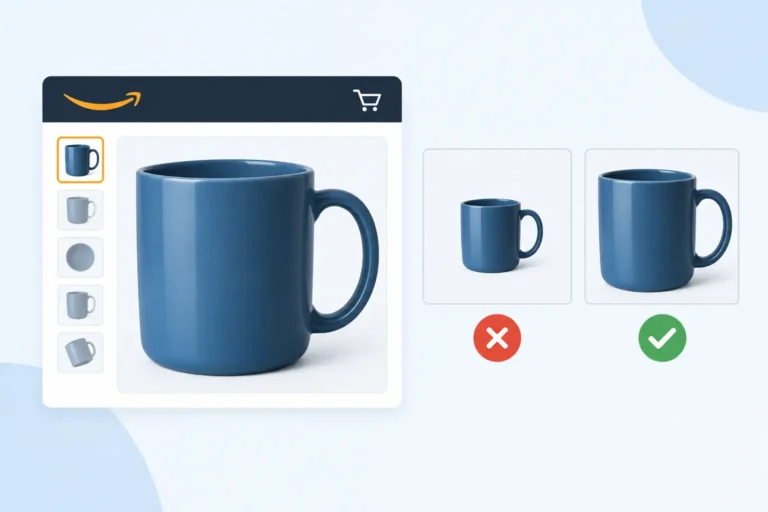
A new visual treatment can cost more than the creative brief suggests. The Amazon AI generated image disclosure tag may change how shoppers read a product image before they reach your bullet points, A+ Content, or reviews. For a challenger brand trying to take clicks from category giants, that first impression matters: an image that looks fabricated can depress conversion even when the ASIN is fully compliant.
What the Amazon AI generated image disclosure tag is
The first operational point is simple: do not confuse an Amazon-applied disclosure with a Seller Central setting you can control. There is no universal catalog attribute called “AI Generated Image Disclosure Tag” in Edit Product Info, no standard column in an Inventory File Template, and no routine field beside Main Image URL or Other Image URL that lets a seller switch a retail-page tag on or off.
Amazon uses several generative-AI tools across shopping and advertising, while image standards are enforced differently in each surface. A customer-facing disclosure can be tied to the tool, placement, country, or creative workflow that produced the asset. That is not the same thing as a permanent product-detail-page rule for every image created with Photoshop’s generative fill, a studio background extension, or an external AI image model.
That distinction prevents a costly mistake: rebuilding 300 image stacks to chase a badge that is not controlled in the catalog. Before changing a live ASIN, record the exact marketplace, device type, placement, date, and whether the image appeared in organic search, on the detail page, or in a Sponsored Brands or display ad. A mobile treatment can differ from desktop, and an Amazon Ads placement is not governed by the same controls as the Manage All Inventory image set.
The rule that still governs your main image
Whether a secondary lifestyle visual uses AI or not, the first image has to win the compliance test before it can win the click. Amazon’s commonly enforced main-image standard requires a pure white background, RGB 255, 255, 255; the product must fill at least 85% of the frame; and the image cannot carry text, logos, borders, props, or inset graphics. Category rules can be stricter, so check the applicable Product Image Requirements inside Seller Central rather than assuming beauty and home categories are interchangeable.
AI creates a particular risk here because it is excellent at inventing the details Amazon’s main-image rules reject. A generated shadow can turn gray. A model’s hand can enter the frame. A bottle label can be altered by one letter. A 2,000-by-2,000-pixel file can look sharp but still misrepresent the product size, pack count, applicator, fragrance variant, or included accessory.
That last error is commercial, not cosmetic. If a customer receives a 30 ml serum after seeing a generated 50 ml bottle, the problem lands as a return, negative review, or “not as described” contact. It can also break a parent-child variation family when the image shown for a shade, scent, or count no longer matches the child ASIN selected in the dropdown.
Keep the main image photographic and product-accurate. Use AI only where it adds a real conversion argument in images 2 through 7: demonstrating scale, routine, texture, use case, or a differentiator that a packshot cannot convey. A disclosure is not automatically damaging, but an implausible scene is. Shoppers can forgive a polished lifestyle image; they do not forgive a haircare bottle with a nonsense label or a supplement scoop that does not exist in the box.
Separate retail content from Amazon Ads creative
A listing image, a Sponsored Brands image, and a DSP asset can all show the same product, but they travel through separate approval and delivery systems. In Seller Central, the catalog image is attached to a SKU and ASIN. In the advertising console, creative is associated with a campaign, ad group, portfolio, audience, and placement. Treating all three as one “Amazon image” workflow is how brands lose track of what shoppers actually saw.
For ads, preserve the source file, prompt or edit record, final export date, and approver for every AI-assisted creative. Then use the Creative assets area and campaign history to identify the live version. If a creative is rejected or paused, record the rejection text verbatim, not a paraphrase from Slack. A policy decision can turn on wording, implied claims, prohibited targeting, or image quality rather than the use of AI itself.
The performance question is measurable. In Campaign Manager, compare the date range before and after a creative change using the Search term report and Placement report. Watch click-through rate, conversion rate, spend, attributed sales, ACoS, and cost per click. If Sponsored Products traffic stays flat but the Detail Page Sales and Traffic by Child Item report shows a fall in Unit Session Percentage, the problem is more likely retail-page conversion than keyword relevance.
Do not declare the disclosure tag guilty after 48 hours and 19 clicks. Build a test period long enough to cover your normal sales cycle and keep the offer stable. Changing the image, coupon, price, review count, stock position, and targeting in the same week produces noise, not a decision. A stockout is especially destructive: it can interrupt organic rank, distort conversion data, and force PPC to repurchase visibility once FBA inventory returns.
A practical review process for AI-assisted images
Start with one ASIN, not a full catalog rollout. Pull its last 30 and 90 days from Reports > Business Reports > Detail Page Sales and Traffic by Child Item. Capture Sessions, Page Views, Ordered Product Sales, Units Ordered, and Unit Session Percentage. For Brand Registry owners, review the relevant query in Brand Analytics > Search Query Performance to see whether click share and conversion share moved against the terms that matter.
Next, inspect every image at 100% zoom beside the physical product and its approved packaging artwork. Check 6 facts: exact logo, product name, net quantity, color or shade, included items, and regulated claims. For cosmetics and wellness products, compare the image copy to the actual label and the Product Description field. “Clinically proven,” “SPF 50,” “kills bacteria,” and before-and-after implications are not harmless design flourishes when a generator invents them.
Then classify the asset by risk. A cleaned-up background behind the real photographed jar is low risk when it does not alter the jar. A synthetic model holding the real jar is medium risk because scale, application, and implied results need checking. A wholly generated packshot, a fabricated comparison chart, or a scene that changes what is included is high risk. High-risk creative belongs in review before upload, not in a live experiment.
For US listings, product representation issues can also collide with FTC advertising standards and category-specific requirements. For UK and EU listings, the legal entity, safety information, responsible person details, and claims still have to stand on their own under GPSR and applicable cosmetics or food-supplement rules. An AI label does not cure misleading content, and a compliant label does not make a misleading AI image acceptable.
When disclosure may help rather than hurt
There are situations where an AI-assisted visual is the right commercial choice. A brand launching 40 shade variants may need controlled lifestyle environments that would be expensive to reshoot for every SKU. A home product may need to show scale across 3 room types. The test is whether the AI saves production cost without creating a gap between customer expectation and delivered unit.
Use the disclosure as a prompt to raise the creative standard. If the image depends on fantasy lighting, impossible product texture, or a model result no real customer can achieve, it will weaken trust whether or not Amazon labels it. The strongest challenger brands do not donate traffic to the giants by looking generic. They show the real product more clearly, make the buying decision easier, and protect that claim through the listing, inventory, and ad account.
This week, choose your 10 highest-traffic child ASINs, export the 90-day Detail Page Sales and Traffic by Child Item report, and audit image 1 through image 7 against the physical unit. Mark each AI-assisted asset low, medium, or high risk, then replace one high-risk image only after you have a clean baseline. That gives you a controlled answer from your own account, not a rumor about a tag.
Want a second pair of seller's eyes on your listings?
We are active Amazon sellers ourselves, not only consultants. See how we handle this in professional Amazon listing building, send us one ASIN for a free brand-control audit, or book a 30-minute strategy call.
Free tools: title rewriter · main image checker · EU compliance checker · AI tag · Stolen from the Giants swipe file