If you’re selling on Amazon, there’s one thing I strongly believe you shouldn’t wait until there’s a problem to do: auditing your account. It may sound dry, but in reality, an Amazon Account Audit is simply the process of reviewing your overall performance and policy compliance, so you can spot risks early and optimize your business before issues escalate.
What is an Amazon Account Audit?
When I talk about an Amazon account audit, I don’t treat it as a “damage control” task or something you only do when problems show up. To me, it’s a health check for your entire Amazon account, a structured review that shows how well the account is running and where hidden risks are building up.
At its core, an Amazon account audit is the process of reviewing performance and policy compliance across the whole account. That includes Account Health, key performance metrics, listings, pricing, inventory, and advertising. Instead of looking at each area in isolation, an audit forces you to see how everything connects. A small issue in listings or inventory can quickly turn into lower CTR, weaker conversion rates, and higher ad costs.
The real value of an audit is being proactive. I’ve seen many sellers only open the Account Health Dashboard after receiving a warning from Amazon. At that point, options are limited. A regular audit helps surface early signals, such as a rising ODR, unusual refund behaviour, lost keyword indexing, or unstable Buy Box ownership, before they turn into serious problems.
Self Audit VS Third-Party Audit
Should you audit the account yourself or bring in a third party? There’s no one-size-fits-all answer, but understanding the difference helps you choose the right approach for each stage of growth.

A self-audit is a review of your own account using a structured checklist. This works well when you understand how Amazon works and are comfortable with metrics like ODR, CTR, CVR, ACoS, and inventory health.
A third-party audit makes sense when the account is larger, more complex, or performance has plateaued without a clear reason. An external expert brings a fresh, unbiased perspective, stronger benchmarks, and often catches blind spots, especially around policy compliance, wasted ad spend, advanced SEO, and campaign structure.
| Criteria | Self Audit | Third-Party Audit |
| Cost | Low | Higher |
| Control | Full control | Shared |
| Objectivity | Limited | High |
| Best for | Regular audits, small–mid accounts | Large accounts or stalled performance |
Account Health & Compliance
When I audit an Amazon account, the very first place I go is the Account Health Dashboard. This is the foundation. If your account health is shaky, no amount of listing or PPC optimization will save you.
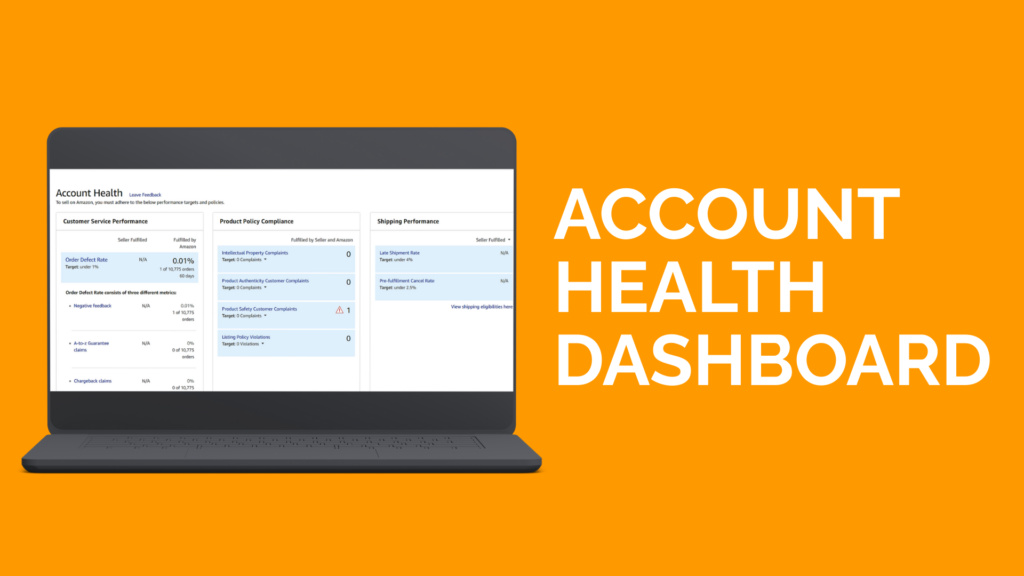
I start by checking whether the dashboard is clean. Are there any open policy violations, unresolved warnings, or compliance requests Amazon has sent but you haven’t addressed yet? You also want to make sure all product compliance documents, including invoices, test reports, and certificates, are complete and easy to access, especially if you sell in regulated categories.
Next, I review the core metrics: ODR, Late Shipment Rate, and Cancellation Rate. I don’t just look at whether they meet Amazon’s thresholds. I look at the trend. A metric can still be “green” today but moving in the wrong direction, which is often an early warning sign.
Performance Metrics Check
After account health, this is where I look at how your business is actually performing. I usually break this part into three core metrics:
Sales trend: I don’t just compare this month vs last month. I look at the trend over time. Are sales stable, slowly declining, or spiking for the wrong reason (promotions, heavy discounts)? A flat or declining trend often points to listing issues, lost keyword ranking, or Buy Box instability.
Conversion rate (CVR): CVR tells me whether traffic is qualified and whether the listing is doing its job. Many industry reports suggest that the average conversion rate on the Amazon marketplace typically falls between 10% and 15%. When CVR drops below roughly 8%, it is often a signal that the listing is underperforming relative to category norms.
Refund & return rate: This metric often gets ignored, but I treat it as feedback. Rising returns usually mean mismatched expectations, wrong images, unclear descriptions, or quality issues. Left unchecked, it hurts both profitability and account health.
Listing Optimization
I look at listing optimization as the bridge between traffic and sales. If this part is weak, everything else, SEO, PPC, and even pricing, works harder than it should.
Here’s how I usually audit a listing:
Title & bullet points: I check whether the main keyword is used naturally in the title and whether the bullets focus on benefits rather than just features. If your bullets read like specs only, you’re leaving conversions on the table.
Images: Your main image must be clean and in compliance with the policy. I then look for strong secondary images: lifestyle, infographics, and use cases. If images don’t answer buyer questions, CVR suffers.
A+ Content (if available): I use A+ to reinforce trust and explain value, not to repeat bullets. Poor A+ won’t kill sales, but good A+ often lifts conversion.
CTR & CVR check: Low CTR points to weak images or titles. Low CVR usually means messaging, pricing, or reviews need work.
Keyword & SEO
In an Amazon Account Audit, the Keyword & SEO section usually explains why a listing gets traffic, or why it doesn’t. Many sellers treat SEO as a one-time setup, but keywords on Amazon shift constantly as search behaviour and competition change.
Primary keyword indexing: I always check whether core keywords are still indexed in the title, bullet points, and description. Losing index means losing visibility, even if the listing looks perfectly optimized.
Keyword coverage vs. competitors: I compare your keyword set with top competitors. If they rank for relevant keywords you’re missing, that’s a visibility gap, not an ad budget problem.
Backend search terms: I review backend terms to make sure they’re used correctly: no repetition, no keyword stuffing, and no unnecessary symbols. This space supports SEO; it doesn’t replace front-end content.
Relevancy over stuffing: I focus on relevance and natural flow. Stuffed keywords hurt readability and often hurt performance as Amazon leans more on user behaviour signals.
Pricing & Buy Box
When I audit an Amazon account, I always look at pricing and the Buy Box together. These two are tightly connected. You can have a well-optimized listing and solid PPC performance, but if your Buy Box ownership is unstable, sales will still suffer.
I usually start by observing Buy Box stability over time. If the Buy Box keeps switching throughout the day, that’s rarely random. In most cases, it points to poor price control, aggressive undercutting from competing sellers, or weak fulfillment advantages. Amazon doesn’t award the Buy Box based on price alone; it evaluates the total offer.
That’s why I don’t chase the lowest price. Instead, I compare your price with sellers who consistently hold the Buy Box. Are they using FBA or FBM? How fast is their delivery? What do their feedback and seller metrics look like? If you’re using FBA, offer fast shipping, and maintain strong account health, you can often keep the Buy Box at a slightly higher price without hurting sales volume.
Automated pricing is another area I pay close attention to. I’ve seen many accounts quietly destroy their margins because the minimum price was set too low. One aggressive competitor can trigger a race to the bottom without you even noticing.
And, pricing should always be reviewed alongside PPC. If you’re forced to discount heavily just to maintain the Buy Box while ACoS remains high, the issue is usually your listing or ad structure, not your price.
Inventory & Fulfillment
Inventory and fulfillment directly reflect how stable your entire account is. In an Amazon account audit, I always see this as one of the highest-risk areas if it isn’t closely monitored.
No out-of-stock situations: I check sell-through rates and restock timing to make sure inventory aligns with real demand. Going out of stock doesn’t just stop sales; it hurts keyword ranking, Buy Box stability, and future velocity. If this happens often, inventory planning needs adjustment.
Healthy IPI score: I review the IPI score to see how well inventory is managed overall. A low or declining IPI usually means excess stock, stranded inventory, or slow-moving ASINs. Even before storage limits kick in, this is an early warning sign in any Amazon account audit.
Error-free FBA shipments: I look for shipment discrepancies, receiving delays, and frequent reconciliation cases. Clean FBA shipments protect cash flow and reduce operational friction. Fewer errors here mean Amazon trusts your process, and your account runs more smoothly as a result.
Customer Service & Reviews
Customer service and reviews tell Amazon, and your buyers, how reliable you are as a seller. This section often explains why conversion drops or why account health starts to weaken, even when listings look fine.
I always check response time first. Keeping buyer messages under 24 hours isn’t just about policy compliance; it builds trust and prevents small issues from escalating into claims or negative feedback. Slow responses usually show a lack of process, nota lack of effort.
Negative reviews get special attention. I don’t see them as something to hide, but as signals. I look at how you respond, whether issues are acknowledged clearly, and if patterns repeat across multiple reviews. Unhandled negative reviews quietly hurt CVR and long-term ranking.
Advertising (PPC)
I don’t start with the budget. I start with structure. A clean structure gives you control, clearer data, and faster optimization decisions.
Clear campaign structure: I always separate Auto and Manual campaigns. Within the manual, I split by match type (Exact, Phrase, Broad) or by goal (core keywords, secondary keywords, ASIN targeting). This setup lets me see exactly which keywords drive sales and which ones only burn spend. If everything sits in one campaign, you’re basically flying blind.
Low wasted ad spend: I go straight to the Search Term Report. Clicks without orders are the first red flag. If a search term keeps spending without converting after enough data, I pause it or lower the bid. PPC isn’t about “waiting and hoping,” it’s about acting on performance signals early.
Negative keywords are actively updated: I never treat negative keywords as a one-time task. During an audit, I check how recently negatives were added. Regular updates are one of the fastest ways to reduce ACoS and protect your budget from irrelevant traffic.
Bids aligned with margin: I set bids based on real profit, not average CPC benchmarks. If a bid pushes ACoS beyond your margin, that campaign isn’t sustainable, even if it generates sales. Good PPC is profitable PPC, not just higher spend.
This checklist is the short version of what we run in a full Amazon consulting audit, where every finding is ranked by what it costs per month rather than by how quickly it can be fixed.
Conclusion
An Amazon Account Audit is a simple habit that helps you stay in control as your business grows. I see many sellers focus on tactics and tools, but skip the basics. A regular audit keeps you grounded in the data and shows you where small issues are quietly hurting performance.
You don’t need to overhaul everything at once. Start with clarity, fix what matters most, and move step by step. That’s how you protect margins, reduce risk, and build long-term, sustainable growth on Amazon.
1. How often should an Amazon Account Audit be done?
A light audit should be done monthly to catch early issues like rising ACoS or falling CVR. A deeper quarterly audit helps spot larger performance and operational trends.
2. Is a self-audit or a third-party audit better?
Self-audits work well for small to mid-sized accounts with solid Amazon knowledge. Third-party audits are more effective for larger accounts or stalled performance.
3. What’s the most common mistake during an Amazon audit?
Focusing on one area, usually PPC, instead of the whole account. Listings, pricing, inventory, and ads must be evaluated together for real results.