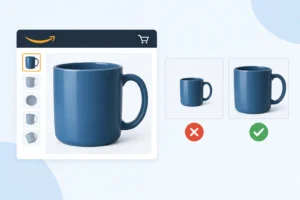
A challenger brand can spend $2.00 per click on PPC, win a top-of-search placement, and still donate the sale to a category giant because its first image looks small, gray, or uncertain on a 6-inch phone screen. The Amazon main image 85 percent fill rule is not a cosmetic preference. It is a front-end conversion requirement that determines whether the product reads instantly before the shopper scrolls.
What the Amazon Main Image 85 Percent Fill Rule Means
Amazon’s product-image guidance requires the product to occupy at least 85% of the image. In practical terms, the product should dominate the canvas without being cropped, distorted, or surrounded by decorative empty space. Amazon does not give sellers an on-screen 85% measurement tool in Seller Central, nor does it publish a universal pixel-calculation formula for every category. Treat 85% as the minimum operating line, not the creative target.
For most packaged consumer products, aim for a product presentation that occupies roughly 85% to 95% of the frame on its longest visual dimension. A 2,000 x 2,000-pixel canvas with a 1,200-pixel-tall bottle floating in the middle is unlikely to compete, even if it looks refined in a presentation deck. The same bottle at about 1,750 pixels tall, with its cap and base fully visible, usually reads much better in Amazon search.
The rule applies to the primary image, commonly called the main image. In Seller Central, find it through Catalog > Manage All Inventory > Edit > Images. This is the image shoppers see in search results, on the detail page before swiping, and in many Sponsored Products placements. Image 2 through Image 9 can explain texture, routine, ingredients, dimensions, and comparison points. Image 1 has one job: make the product unmistakable at a glance.
Why 85% Fill Changes the Commercial Result
On a crowded search-results page, a small product image is a weak signal. A shopper comparing 24 magnesium supplements, skin serums, or hair masks is not studying your label at 100% zoom. They are scanning color blocks, pack size, silhouette, and perceived legitimacy in fractions of a second.
That makes fill rate a click-through issue before it becomes a conversion issue. A clean white background, a large pack shot, and a readable front label can earn the click. A stronger detail page then needs to earn the order. Do not confuse the two metrics in the Business Reports data: Sessions measures traffic, while Unit Session Percentage shows ordered units divided by sessions.
Use Reports > Business Reports > Detail Page Sales and Traffic by Child Item to compare a 14-day period before and after an image replacement. Record Sessions, Page Views, Ordered Product Sales, Units Ordered, and Unit Session Percentage for the specific child ASIN. Do not use total account sales as proof that one image worked. A Prime event, a coupon, a stockout on a competitor’s ASIN, or a PPC bid change can move the same numbers.
For Brand Registry sellers, Brands > Brand Analytics > Search Query Performance is the second check. Review the Search Query Performance dashboard at the query level, then compare your ASIN’s Click Share and Purchase Share around the image-change date. If Click Share improves but Purchase Share does not, the main image may have won more curiosity than qualified traffic. The fix may sit in price, reviews, variation setup, or the promise made by the image versus the product delivered.
The Main-Image Rules That Fail Listings
The 85% rule works alongside Amazon’s other main-image requirements. The background should be pure white, conventionally specified as RGB 255, 255, 255. The image must show the actual item for sale, and it must include only what the shopper receives. If a skincare set contains 3 products, show the 3 products. If the dropper, pouch, or refill is not included, do not use it to make the image look more premium.
Main images are not infographic territory. Avoid text overlays, badges, star ratings, claims, borders, logos added as graphics, inset photographs, lifestyle scenes, and gift props. A 10% off flash in Image 1 can trigger rejection or suppression, and it also creates a bad operational habit: building a sales claim into an asset that cannot be updated as easily as price or a coupon.
Models are generally not permitted in the main image for most categories, and apparel has its own category-specific presentation rules. Jewelry, shoes, and fashion products can have exceptions or different requirements, which is why copying a winning beauty ASIN into a clothing catalog is a bad move. Check the category style guide attached to your product type before rebuilding 40 SKUs around one interpretation.
Amazon supports several file types, but JPEG is the practical default for a controlled production workflow. Use a square image where possible, typically 2,000 x 2,000 pixels, then inspect the exported file at 200 x 200 pixels and at mobile scale. Amazon generally recommends images of at least 1,000 pixels on the longest side to support zoom. More pixels will not rescue a weak composition, but a 500-pixel source file will make a premium product look cheap when Amazon enlarges it.
How to Judge Fill Without Guessing
Start in the creative file, not after the listing is live. Place a temporary square grid over the canvas and identify the product’s outermost visible edges. The product should take command of the frame while retaining a small, even margin. A 5% to 8% safety margin is often more sensible than pushing the pack to the edge, because a clipped cap or cropped carton can create a different compliance problem.
Do not measure transparent padding as product. This is a frequent failure with PNG exports and agency-supplied cutouts. The graphic file may be 2,000 x 2,000 pixels, yet the actual bottle can occupy only 65% of the visible area because 350 pixels of transparent space surround it on each side. Once Amazon renders that file against white, the product looks timid.
Also inspect the visual, not merely the bounding box. A narrow toothbrush, a slim eyeliner pencil, or a single sachet may technically span 90% of one dimension but still look insignificant because it covers little of the frame. In those cases, the right answer depends on the offer. A 4-pack shown only when 4 units are included is legitimate. Adding 3 extra units to a single-SKU image is not.
For bottles and jars, shoot the front-facing label square to the camera and let the pack do the work. A dramatic 45-degree angle may suit Image 4, but it can reduce label legibility in search. For multipacks, keep every unit visible enough to be counted. A shopper who believes they are buying 2 units and receives 1 creates a return risk, a negative review risk, and a conversion problem that no TACoS spreadsheet can explain away.
Check the Listing After the File Is Live
Upload the asset in Catalog > Manage All Inventory > Edit > Images, then allow time for Amazon’s processing and caching. Check the live child ASIN rather than relying only on the Edit page preview. Parent-child variation errors can make a strong image appear against the wrong scent, shade, or pack count, particularly after a flat-file update or a variation relationship repair.
Then inspect 3 places: desktop search results, the mobile detail page, and Sponsored Products placements. Search at least 3 high-intent terms where the ASIN already receives impressions. The Search Term report in Advertising > Reports can identify terms that generated impressions and clicks over the last 30 days, while Brand Analytics can show whether those terms are commercially meaningful beyond paid traffic.
If the listing becomes suppressed, look in Catalog > Manage All Inventory for the Suppressed status and use Fix Your Products where available. Do not respond by repeatedly uploading slightly different files without finding the trigger. Check the file name, the Image 1 slot, background color, text overlays, included-item accuracy, and the category style guide. Repeated blind edits can leave a high-traffic ASIN carrying the wrong image through a weekend of PPC spend.
When More Fill Is Not Better
The 85% rule is a floor, not permission to crop aggressively. A facial cleanser with the cap cut off may fill 98% of the canvas but look like a broken image. A 12-ounce tub pushed too close to the frame may hide the flavor descriptor that distinguishes it from a 16-ounce competitor. For products with legally required front-of-pack information, readability matters as much as dominance.
There is also a category trade-off. A single lipstick tube can look oversized if it fills 97% of a square, while a 6-piece skincare regimen can look too small at 85% because the individual items lack separation. The real test is whether the shopper can identify the product, the count, and the primary variant at a glance. If they cannot, the image is not doing its job, even if a design team can defend the math.
This week, export the current Image 1 file for your 10 highest-session child ASINs, place each on a 2,000 x 2,000-pixel grid, and mark the actual product edges. Start with the ASINs that have high Sessions but weak Unit Session Percentage in the Detail Page Sales and Traffic by Child Item report. Replace only the clearly undersized or non-compliant images, log the change date, and measure the next 14 days. That is how you stop paying to send shoppers to the giants.
Want a second pair of seller's eyes on your listings?
We are active Amazon sellers ourselves, not only consultants. See how we handle this in professional Amazon listing building, send us one ASIN for a free brand-control audit, or book a 30-minute strategy call.
Free tools: title rewriter · main image checker · EU compliance checker · AI tag · Stolen from the Giants swipe file