There are numerous metrics to track your Amazon ads; however, TACoS is the one metric that delivers the complete picture of your brand’s health. It shows how your ad spend impacts total revenue.
Let’s explore strategies to optimize TACoS in a way that will help boost ad efficiency as well as increase long-term profitability.
What are Amazon TACoS? (Total Advertising Cost of Sales)
TACoS stands for Total Advertising Cost of Sales. It’s a high-level profitability metric that measures a seller’s total advertising spend as a percentage of their total sales revenue (which includes both paid and organic sales).
Usually, it’s good for the TACoS to decrease since it indicates that the business is spending less on advertising to generate each dollar of overall revenue.
In general, when you see a decreasing TACoS, it means that your ads are working effectively to increase organic visibility and ultimately strengthen brand presence and reduce reliance on paid traffic.
A flat or increasing TACoS may indicate you’re too dependent on paid sales, with little organic growth coming from your advertising efforts.
Look at the Amazon Flywheel concept. On Amazon, a common version of the flywheel suggests:
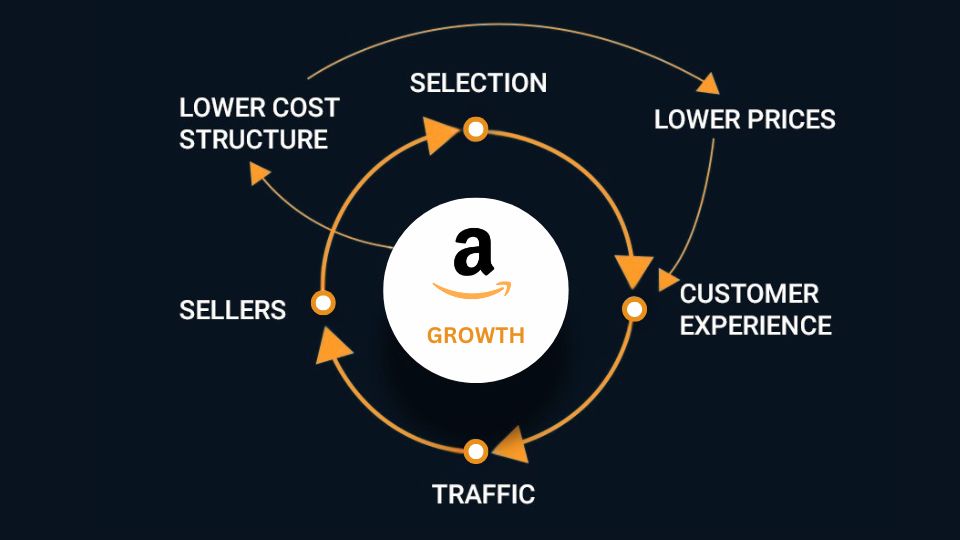
The Amazon Flywheel is a business concept where positive elements reinforce each other in a continuous cycle to drive growth. TACoS is specifically created to monitor how your ads influence the Amazon Flywheel over the long haul.
For sellers, running effective paid advertising can lead to quick sales. These sales send a clear message to Amazon’s algorithm that your product is both relevant and in demand, which can boost its organic keyword ranking.
As organic sales pick up thanks to improved rankings from that initial ad spend, you’ll notice total revenue climbing at a quicker pace than your ad expenses.
This trend leads to a decrease in TACoS over time, which shows that your ads are successfully driving the flywheel and fostering sustainable, profitable organic growth.
What is the TACoS Formula?
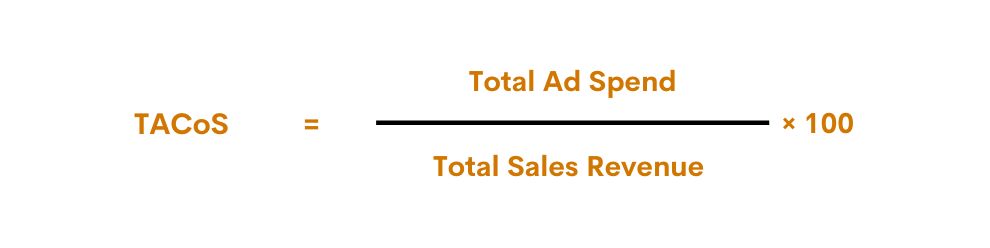
The TACoS formula measures how much of your total sales revenue is being spent on advertising:
- Total Ad Spend = How much money you spend on ads.
- Total Sales Revenue = Combined sales from both ad-attributed sales and organic sales.
If TACoS trends downward over time, it shows that ads are helping to boost organic ranking, and reliance on paid sales is decreasing.
You can definitely calculate TACoS manually with some basic data, but honestly, it can take a lot of time, especially if you’re managing multiple products and campaigns.
Most Amazon analytics tools and dashboards automatically calculate TACoS for you. In Amazon Seller Central, the data needed to calculate TACoS can be compiled by combining reports from the Advertising Console and Business Reports.
Read more Amazon Seller vs. Vendor vs. Hybrid Model
What is a Good Amazon TACoS?
A lower TACoS is generally better. But a very low TACoS (0 – 3%) may suggest you’re under-leveraging the potential of Amazon PPC.
A low and, more importantly, decreasing TACoS over time indicates:
- Your ad spend is effectively building organic rank and brand awareness.
- Your products are generating a significant portion of their revenue from “free” organic searches.
- Your overall business is becoming less reliant on paid advertising for sales velocity.
There is not a single perfect TACoS number. TACoS below 10% is considered excellent (5 – 10% is the ideal). This is the perfect range for a mature product. It indicates that strong organic rankings and highly efficient ad spend.
However, if TACoS falls below 2% or even below 5%, it may suggest you’re not fully leveraging the Amazon PPC platform.
TACoS in the 10–15% range is generally considered healthy for most businesses. This is ideal for growing, profitable brands that are successfully balancing ad spend with organic growth.
However, TACoS above 20% is usually a warning. While it may be acceptable for new product launches, it is generally a red flag for mature products.
SUMMARY: The aim here is to keep the TACoS low and on a downward trend. This really indicates that a brand is thriving and growing sustainably.
A good TACoS depends on your business context.
Product Lifecycle:
When launching a new product, it’s pretty common for your TACoS to be on the higher side, sometimes even exceeding 20%. You really need to invest heavily at this stage to kickstart your sales momentum, gather reviews, and boost your organic ranking. The aim here is to watch that high TACoS start to drop quickly as your organic sales pick up steam.
For a mature product, TACoS should decline over time (around 5% – 15%) as organic visibility grows. The goal shifts to maximizing profit, so you dial back ad spend to a maintenance level.
For established products, a TACoS above 20% may indicate that campaigns need optimization.
Business Goal:
If your priority is to capture market share or dominate a niche, a higher TACoS is acceptable because you’re intentionally investing in aggressive advertising to fuel the Amazon Flywheel.
However, to maximize profit, aim for a lower TACoS.
Profit Margins:
TACoS < Gross Product Margin (Ideal): Your ads are profitable.
TACoS > Gross Product Margin: You are spending more on ads as a percentage of your total revenue than your profit margin allows. You are losing money on every total dollar of sales.
IMPORTANT: TACoS = Gross Product Margin (break-even point): You are breaking even on the dollar amount spent versus total sales. This strategy is only acceptable for a limited time during a product launch to maximize rank and long-term customer acquisition.
Differences between TACoS vs. ACoS vs. ROAS
When analyzing Amazon advertising performance, three key metrics are commonly used: ACoS, TACoS, and ROAS.
ACoS (Advertising Cost of Sales):
ACoS measures how much you’re spending on ads compared to the sales directly attributed to those ads. It helps sellers determine if an ad campaign is profitable in the short term.
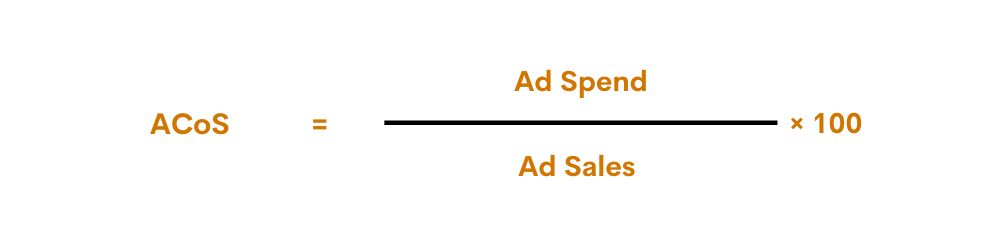
Similar to TACoS, lower ACoS is generally better, but very low ACoS might mean you’re underinvesting in ads.
ROAS (Return on Ad Spend):
ROAS measures how much revenue is generated per dollar spent on ads. It’s essentially the inverse of ACoS.
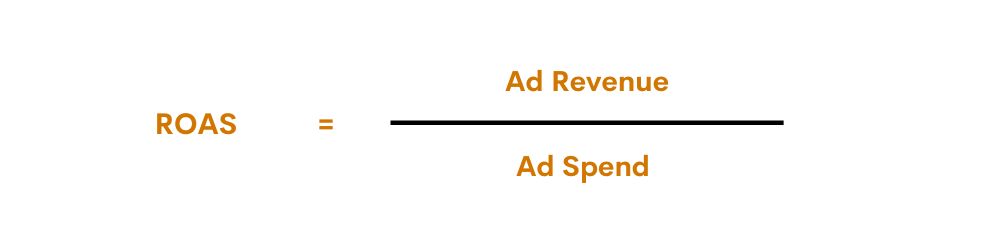
ROAS is used in more general digital marketing (Google Ads, Facebook Ads, etc.) and creates a familiar structure for comparing return on investment across digital advertising platforms.
When you use these metrics:
ACoS is best monitored on a daily or weekly basis for campaign optimization, allowing PPC managers to fine-tune keywords, adjust bids, and eliminate wasted spend within specific ad groups.
ROAS is useful for comparing revenue generation across campaigns or ad types to prioritize high-return campaigns.
TACoS, or Total Advertising Cost of Sales, is a key profitability metric that looks at how much you’re spending on advertising compared to your overall sales, which includes both paid and organic sales. It’s a good idea to check your TACoS on a monthly or quarterly basis to get a sense of your strategic health and track your organic growth.
Strategies to Optimize Your TACoS
A lower TACoS means you’re spending less on advertising relative to your total sales. To make this happen, you can either enhance the efficiency of your ads or increase your organic sales.

Here are several methods that help you lower ad spend waste:
1. Optimize PPC Campaigns
The goal is to eliminate waste. Your search term report will show terms that received clicks but generated zero sales.
Adding these as negative keywords, you’re instructing Amazon to stop showing your ad for irrelevant searches to drastically cut wasted ad spend without sacrificing profitable conversions.
2. Refine Bidding Strategies
Regularly adjust bids. Instead of using flat, generic bids, you should bid higher on proven, high-converting keywords (where your product is most relevant). Also, lower on broader, less certain keywords.
3. Use Campaign Segmentation
You can assign a higher, more aggressive budget to your high-performing “exact match” campaigns and a more conservative budget to “broad match” campaigns (used for discovery).
4. Optimize Product Targeting Ads
You will want to continually examine the placement report to determine where your advertisement performs best, such as on top-of-search versus product pages.
By optimizing targeting to focus on the highest-converting placements, as well as optimizing the exact ASINs you are targeting, you will convert a higher percentage of ad clicks.
5. Scale High-Performing Campaigns and Pause What Doesn’t
This is the core of PPC management. Campaigns with a high ACoS and low conversion rate are financial drains and must be paused or drastically reduced.
Constantly analyze campaign data. Scale the ad groups/keywords with the lower ACoS and higher ROAS.
To increase organic sales, check out these five strategies:
6. Optimize Product Listings
There is a way to improve the organic rank. Ensure that you include relevant high-volume keywords in titles, bullet points, and descriptions, along with having high-quality product images and A+ content.
7. Drive More Positive Reviews and Ratings
When a shopper lands on your page (whether from a paid ad or organic search), social proof is critical for conversion. Encourage reviews through Amazon’s Vine program, post-purchase emails, or inserts (within TOS).
8. Enhance Brand Presence
According to the 2025 Edelman Report, 88% of consumers say that when choosing which brands to buy from, trust is just as important as price and quality. A+ Content and Brand Stores can build brand equity and trust, which improves a product’s organic conversion rate.
Furthermore, customers who trust your brand are more likely to search for it directly, leading to Brand Searches, which are always organic and result in a lower TACoS.
9. Drive External Traffic to Amazon
Send traffic from social media, influencer campaigns, email lists, or even Google Ads. By sending non-Amazon traffic to your listing (using Amazon Attribution links), the resulting sales often receive an extra boost to organic ranking from Amazon’s algorithm.
10. Launch Promotions and Deals Strategically
Lightning Deals or coupons create a burst of sales velocity over a short period. The high velocity acts as a signal to the A9 algorithm that your item is in high demand, so your item will receive some improvement in its organic ranking.
After the promotion concludes, your item will continue to have a better ranking and thus generate a good amount of organic sales.
If your TACoS is climbing while revenue is flat, something structural is wrong. That is exactly the question an Amazon consulting audit answers.
Conclusion
What makes concentrating on TACoS so compelling is that, one: it provides a view of your advertising efficiency across your Amazon business, and two: it can guide strategic decisions to maximize both organic and paid growth. Put these strategies together, and it’s possible to optimize your TACoS while increasing overall sales and profitability. That’s, of course, an ideal plan.
FAQs
What does TACoS stand for in Amazon PPC?
TACoS (Total Advertising Cost of Sales) is a key metric in Amazon PPC that measures the relationship between your total ad spend and your total sales revenue (which includes both sales directly attributed to your ads and your organic sales). A decreasing TACoS is generally positive.
What does an increasing TACoS trend mean?
It indicates that your ad spend is growing at a faster rate than your total sales revenue. An increasing TACoS trend means that your business is becoming more heavily dependent on paid advertising. It may suggest a potential decline in your overall business health and long-term profitability.
What is a good TACoS percentage on Amazon?
In general, a good TACoS depends on your profit margin and product maturity. TACoS below 10% is considered excellent. For a healthy, established Amazon business, TACoS should range from 5 to 15%.
How does a successful ad campaign affect TACoS?
A successful ad campaign decreases the TACoS trend over time. When organic sales go up, total sales (denominator) in the TACoS formula also go up while ad spending (numerator) remains the same or is optimized. A lower TACoS number indicates more effective advertising and sustainable long-term growth.
What are the most popular TACoS?
TACoS, or Total Advertising Cost of Sales, is an essential metric that helps you understand how much you’re spending on advertising compared to your total sales, which includes both paid and organic sales. The main aim is usually to lower your TACoS over time.