Running Amazon Sponsored Products ads looks simple: pick a keyword, set a bid, and let it run. That’s exactly why so many sellers burn money fast. After managing real campaigns, one thing is clear: most losses don’t come from low demand or bad products, but from basic PPC mistakes that quietly drain budgets every day.
Overbidding on the wrong terms, trusting auto campaigns too much, ignoring search term reports, these errors don’t feel dramatic, but they add up. If your ad spend keeps rising while sales stay flat, chances are you’re making at least one of the mistakes below.
Running Amazon Sponsored Products Without Clear Objectives
A lot of sellers run Sponsored Products with no real goal in mind. They turn on ads because everyone else does, then hope sales improve. That’s how budgets get wasted. Amazon PPC only works when the objective is clear. Different goals require very different setups. Mixing them in one campaign usually leads to bad data and poor decisions.
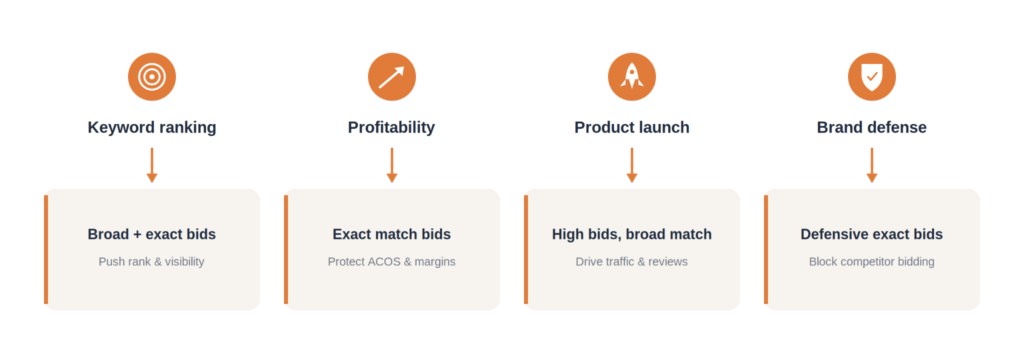
Common PPC goals include:
- Keyword ranking: push visibility and sales velocity
- Profitability: control ACOS and protect margins
- Product launch: generate traffic and reviews fast
- Brand defense: block competitors from bidding on your brand terms
Each goal needs its own bidding logic and targeting style.
For example, during a launch, high ACOS is normal. You bid aggressively, allow broad traffic, and focus on exposure. In contrast, profit-driven campaigns rely on exact match keywords, tighter bids, and strict spend control.
When sellers don’t define a goal, problems show up fast:
- Budgets go to the wrong keywords
- Profitable terms get underfunded
- Launch campaigns get killed too early
- ACOS looks “bad” without context
Relying Too Much on Automatic Campaigns
Automatic campaigns look great on the surface. You set them up, let the algorithm run, and hope performance improves while you focus on other things. The problem is what happens after that initial setup. When everything runs on autopilot, you lose visibility into what actually drives results.
Algorithms optimize for what they can measure easily, not for what matters most to your business. They chase short-term signals like clicks or cheap conversions, even when those leads never turn into real customers. If you don’t step in, budgets drift toward low-quality traffic and irrelevant keywords. Performance may look “stable” in the dashboard, but revenue tells a different story.
Automatic campaigns also flatten the strategy. Messaging becomes generic. Targeting gets broad. You stop testing new angles because the system already “decided” what works. Over time, this kills differentiation, especially in competitive markets where small positioning tweaks make a big difference.
Strong campaigns come from combining machine speed with human judgment. You still need to review search terms, adjust budgets, and refine audiences.
Ignoring Search Term Reports
The Search Term Report tells you exactly where your money is going and why. Ignoring it is one of the fastest ways to burn budget in Amazon PPC. In fact, without regular search term cleanup, 30-40% of ad spend can quietly go to clicks that never turn into orders.
The first common mistake is not checking the report at all. Sellers launch ads, let them run, and only look at ACOS at the end of the month. At that point, the damage is already done. The second mistake is just as bad: checking the report but taking no action. You see irrelevant terms, high clicks with no sales, and then move on.
The fix is straightforward. Start by identifying search terms that actually convert. Pull those terms out and move them into manual campaigns, where you can control bids and match types. These are the keywords that deserve more budget. On the other hand, search terms that spend money without generating orders should be added as negative keywords immediately. This stops wasted spending before it compounds.
Search term reports also guide match type optimization. Broad is for discovery, phrase gives you more control, and exact is where profitability usually comes from. Without the report, you’re guessing when to make that shift.
The impact is direct and measurable: lower wasted spend and higher conversion rates. For new products, review the report 2-3 times per week. For mature products, once a week is enough. Skip this step, and every other PPC optimization becomes much less effective.
Poor Keyword Match Type Strategy
Poor match type strategy is one of the most common Amazon Sponsored Products mistakes in real campaigns. Many sellers sit at two extremes. They either use only broad match to chase volume, or only exact match because they’re afraid of wasted spend. Broad-only setups pull in messy traffic and push ACOS up fast. Exact-only setups look “safe” but quietly cap growth because discovery stops.
Each match type has a clear role in Amazon Sponsored Products:
- Broad match: keyword discovery and search term mining
- Phrase match: better control while keeping decent reach
- Exact match: profitability and scalable sales
Problems start when sellers expect one match type to do everything.
The cleanest structure is simple:
- Separate campaigns by match type
- Set bids based on the goal of each campaign
- Move converting search terms from broad to phrase or exact
This structure gives you cleaner data, clearer decisions, and a setup that’s much easier to scale and optimize over time.
Not Using Negative Keywords Effectively
A common mistake is skipping negatives altogether. Another is adding them with the wrong match type, which either blocks useful traffic or fails to stop the bad searches. When used properly, negative keywords help your ads avoid the wrong audience and cut wasted spend fast.
The terms you block usually fall into a few clear groups:
- Irrelevant searches that don’t match the product
- Low-intent queries from shoppers who aren’t ready to buy
- Competitor brand names, depending on your bidding strategy
Keep negative exact and negative phrases separate. Pull new negatives directly from the search term report on a regular basis. This habit alone can stabilize ACOS without touching your bids.
Poor Budget & Bid Management
Bidding in Amazon Sponsored Products isn’t about going high or playing it safe. Bid too high, and you overpay for clicks that don’t convert. Bid too low, and your ads barely show, even for good keywords. Both hurt performance, just in different ways.
A common mistake is setting bids once and never touching them again. Performance changes, competition shifts, but bids stay the same. Another issue is pouring budget into campaigns that clearly aren’t working, while profitable campaigns run out of money halfway through the day.
Better results come from active control:
- Increase bids on keywords that consistently convert
- Reduce bids or pause keywords that burn spend without sales
- Allocate budget based on campaign goals, not gut feeling
To make smart decisions, you need to watch the right signals:
- ACOS to track efficiency
- CTR to judge keyword relevance
- Conversion rate to see if traffic quality is strong
When bids and budgets follow performance, spend stays under control, and growth becomes predictable
Ignoring Listing Quality & Conversion Rate
Amazon Sponsored Products can bring traffic, but they can’t fix a weak listing. Many sellers keep increasing ad spend while the real problem sits on the product page. The traffic is fine. The listing just doesn’t convert.
Images that don’t explain the product, titles that miss buyer intent, vague bullet points, weak reviews, or pricing that’s out of sync with the market all drag the conversion rate down. When these pieces aren’t right, ads only amplify the problem. You pay more clicks to get the same poor result.
The most common mistake is running aggressive PPC before the listing is ready. Sellers see low sales, assume the issue is visibility, and push more budget into ads. The outcome is predictable: ACOS stays high even when traffic is highly relevant.
PPC and listing optimization have to work together. Ads bring shoppers in. The listing does the selling. When the conversion rate improves, every dollar spent on Amazon Sponsored Products works harder without raising bids.
Most of these mistakes are invisible from inside the account because they look like normal spend. A second pair of eyes helps — that is what our Amazon consulting service is for.
Conclusion
Most Amazon Sponsored Products campaigns don’t fail because the product is bad. They fail because small PPC mistakes stack up over time. Unclear goals, lazy automation, ignored data, poor structure, and weak listings quietly drain budget day after day.
Know what each campaign is meant to achieve. Read your search term reports. Control match types, bids, and negatives with intent. Make sure your listing can actually convert the traffic you’re paying for. When strategy, execution, and listing quality line up, Amazon Sponsored Products start acting like a growth tool you can scale with confidence.
1. Why do many sellers run Amazon Sponsored Products ads but struggle to make a profit?
Because ads are often run without a clear goal or ongoing control. Budgets get spread across keywords that look busy but don’t actually drive sales.
2. What’s the clearest sign that an Amazon PPC setup isn’t working?
Ad spend keeps increasing while sales stay flat or grow slowly. ACOS rises, but it’s hard to pinpoint which keywords are causing the problem.
3. What’s the simplest action to improve Amazon Sponsored Products performance?
Review search term reports regularly and act on them. Cut what doesn’t convert and push budget toward keywords that consistently generate orders.