Most Amazon storefronts don’t fail because of bad products; they fail because of poor design choices. I’ve seen stores with solid listings lose customers in seconds just because the layout felt confusing or untrustworthy. When people land on your storefront, they decide fast whether to stay or leave. Small mistakes can quietly hurt your conversions without you noticing. If you’re building or updating your store, these are the storefront design mistakes that tend to cost sellers the most.
How Amazon Storefront Design Impacts Your Brand Success
Your storefront is often the first real impression customers get of your brand. If it looks messy or hard to navigate, people leave without thinking twice. A clean, clear design builds trust fast and makes shopping easier. It also helps your products feel more premium, even before customers read the details.
Good storefront design can:
- Guide visitors to the right products quickly
- Highlight your brand story in a simple way
- Increase time spent on your page
- Improve conversion rates without changing ads
Mistake #1: Poor Visual Hierarchy
People don’t read your storefront; they scan it. If everything looks the same size or weight, they don’t know where to look first. That’s where poor visual hierarchy hurts. I’ve seen storefronts where banners, product images, and text all compete for attention. The result is simple: visitors feel lost and leave.

You need to guide the eye step by step. Start with a strong hero image or headline, then lead into categories or featured products. Use size, spacing, and contrast to create a clear path. Important elements should stand out without overwhelming the page.
Common signs of weak hierarchy:
- Too many large elements fighting for attention
- No clear starting point on the page
- Text blocks that blend into the background
When your layout flows naturally, customers move through your store without thinking. That’s when browsing turns into buying.
Mistake #2: Low-Quality Images and Graphics
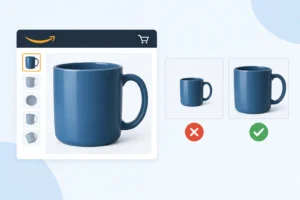
People see images first. But lots of storefront designs have fuzzy, poorly lit, inconsistent images. This immediately reduces the perceived value of the product, even if it is good. Using over-compressed images or colours that don’t match makes the page look unprofessional and rushed. Amazon shoppers are fast; if your visuals don’t grab their attention immediately, they won’t give them a second look.
The fix is simple, but you have to be consistent. Use high-resolution images (at least 2000px) so customers can clearly zoom into the images. Natural lighting, no dark or overexposed shots, keep colours and backgrounds consistent. Close-ups with different angles and details, lifestyle images for context, clean graphics with focus on key features only.
Mistake #3: Lack of Brand Consistency
Many storefronts look good in isolation but feel disconnected as a whole. Colors shift, fonts change, and images follow no clear style. That inconsistency makes your store harder to trust. Shoppers don’t remember your brand because nothing ties it together—or reflects a clear brand story.
Consistency isn’t about being fancy; it’s about being recognizable and reliable. Your visual identity should reinforce your brand story at every touchpoint. Pick a fixed color palette, stick to one or two fonts, and keep a uniform visual style across images. Your banners, thumbnails, and product sections should all feel like they belong to the same brand. When everything aligns, your storefront looks more professional and keeps visitors browsing longer.
Mistake #4: Ignoring Mobile Optimization

A lot of Amazon storefronts look fine on desktop but break down on mobile. Text becomes too small, images get cropped, and sections feel cramped. 57% of Amazon traffic comes from mobile shoppers. If users have to zoom in or scroll awkwardly, they leave fast.
Fixing this starts with simple checks.
- First, always preview your storefront on mobile before publishing. Look at spacing, font size, and how images scale.
- Second, use large, clear visuals that still make sense when resized. Avoid packing too much text into banners.
- Third, keep your layout clean. Stack sections vertically and leave enough white space so the content feels easy to scan.
- Fourth, make buttons and links easy to tap, no tiny click areas. Finally, test loading speed. Heavy images can slow everything down on mobile data.
Mistake #5: Overloading the Storefront with Content
A cluttered Storefront Design confuses people fast. When shoppers land on your page, they want clarity, not a wall of text, banners, and product blocks fighting for attention. Too much content makes it harder to know where to look, and many will just leave.
A lot of storefront design pages are packed with every product, every deal, and long brand stories all on one screen. The result? Nothing stands out. Your best items get buried, and your message gets lost.
Keep it focused. Show your top categories first. Highlight a few key products instead of everything you sell. Use short, clear headings. Let images breathe with enough spacing so each section is easy to scan.
Think like a shopper scrolling on their phone. Can they understand your offer in a few seconds? If not, trim it down. Good Storefront Design is about guiding attention, not overwhelming it. Every section should have a purpose. If something doesn’t help the customer decide or explore, remove it.
Mistake #6: Weak Call-to-Action (CTA) Placement
You’ve done the hard work, clean layout, strong visuals, and clear product sections. But if your CTA sits in the wrong spot, people won’t click. Many storefronts hide buttons too low, blend them into the design, or repeat the same vague line like “Shop now” everywhere. It doesn’t guide the shopper.
Place CTAs where decisions happen: after a product benefit, near top sections, and at the end of each scroll. Make them stand out with contrast and simple wording. “See best sellers” or “Find your size” works better because it tells users exactly what to do next.
Mistake #7: Not Using Analytics to Improve Design
Many storefronts look fine on the surface, but perform poorly because no one checks the data. You can’t fix what you don’t measure. Brands keep the same layout for months, even when certain sections get almost no clicks. That’s wasted space.
Start with Amazon Store Insights. Check traffic, page views, and sales by page. Identify your top and bottom performers. If a page gets traffic but low sales, the issue is likely messaging or layout. If it gets no traffic, the problem is placement or navigation — or the store simply is not getting visitors in the first place, which is a question of how you drive external traffic to the storefront rather than of design. Next, look at click behavior. Which sections get attention? Which ones are ignored? Move high-interest products closer to the top. Cut or replace blocks that don’t earn clicks.
Run small tests. Change one thing at a time: CTA text, image order, headline, or product grouping. Give it a week, then compare results. Keep what works, drop what doesn’t. Use heatmap tools if available to see where users stop scrolling. Shorten long sections or break them into clearer blocks.
Conclusion
Most Amazon storefronts fail for simple reasons: messy layout, unclear messaging, and zero focus on how people actually shop. These mistakes don’t just hurt the look; they kill conversions. Fixing them isn’t complicated: cut the clutter, guide the user, and make every section serve a purpose. When your storefront feels easy to navigate and quick to understand, people stay longer, and more importantly, they buy.
1. How often should I update my Amazon Storefront?
Update it when something changes, new products, big campaigns, seasonal sales. If nothing major happens, a quick review every 1-2 months is enough. Don’t let it feel outdated or disconnected from your current listings.
2. What tools can help improve Storefront design?
Use Amazon Store Builder for the structure. Canva works well for simple visuals, and Photoshop if you need more control. Amazon Brand Analytics helps you understand what customers care about so you can adjust content accordingly.
3. Can a better Storefront really increase sales?
Yes. A clean, easy-to-navigate storefront helps shoppers find products faster. Less confusion means fewer drop-offs and more purchases. It won’t fix a bad product, but it makes your existing traffic convert better.