Selling on Amazon feels great until you notice someone else is winning the buy box on your own listing. These hijackers don’t just steal your sales; they send out cheap knockoffs that wreck your hard-earned reputation. You wake up to one-star reviews for a product you didn’t even ship. It’s a nightmare that can tank your business overnight.
Amazon Brand Registry is your best defense. It moves you from constantly playing defense to actually owning your space. Here is how to lock down your listings and kick hijackers off for good.
What are Amazon Hijackers?
Amazon hijackers are sellers who jump onto your listing and start selling under your product page without permission. They don’t create anything new; they simply “piggyback” on the work you’ve already done. Before you report anyone, it is worth knowing which unauthorized offers Amazon will actually remove and which are lawful resale.
In many cases, these sellers aren’t offering the same product quality. Some ship counterfeit items, others send lower-quality versions that don’t match your standards. A common tactic is undercutting your price to win the buy box. Since up to 98% of Amazon sales go through the Buy Box, losing it can instantly cut off the majority of your revenue.
The real damage shows up quickly. Customers receive poor products and leave negative reviews on your listing, not knowing the difference. You lose control of the buy box, which means fewer sales. Over time, your brand takes the hit. Trust drops, conversion rates fall, and your listing becomes harder to recover.
What Is Amazon Brand Registry?
Amazon brand registry is a program that gives brand owners more control over how their products are displayed on Amazon. Once you’re a member, you can protect crucial elements of your brand, like your trademark, logo, and product listings. This is important because if you don’t have it, other sellers can jump on your listing and sometimes make changes that are not in line with your brand.
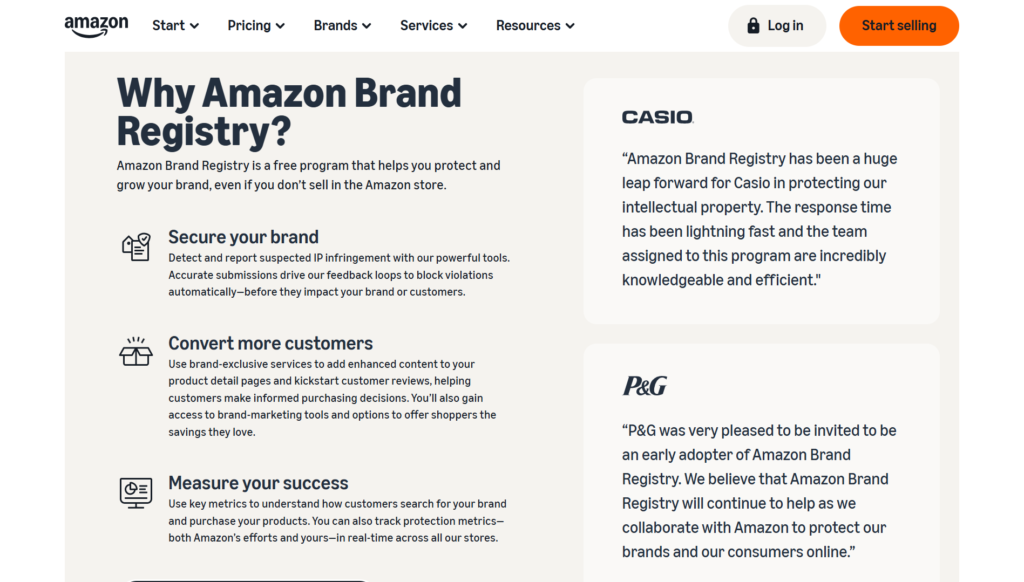
Brand registry gives you tools to report hijackers, take down inaccurate content, and maintain consistency across your listings. It also helps Amazon identify you as the official brand owner, so your input counts for more.
This program is mainly for brand owners and private label sellers with a registered trademark. If you are building a brand (not just reselling), this is one of the first steps to protect your brand and avoid losing control of your own listings.
Key Benefits of Amazon Brand Registry
Brand registration changes how much control you have over your business on Amazon.
Greater Control Over Product Listings
Once you’re in brand registry, you take back control of your listing. You decide how your product title, images, and descriptions appear. Amazon gives priority to brand-registered sellers, so random edits from other sellers are far less likely to stick. This keeps your listing consistent and aligned with your brand.
Proactive Brand Protection
You get tools to act early. You can report hijackers, counterfeit products, and listing abuse faster. Amazon also scans for suspicious activity tied to your brand. Instead of fixing damage later, you reduce the chance of it happening in the first place.
Access to Powerful Tools
You unlock features that regular sellers don’t have. Better search tools, reporting systems, and brand-level controls help you manage listings more efficiently, especially as you scale.
Improved Customer Trust
With A+ Content, you can build richer product pages using better visuals and clear messaging. A Brand Store gives you a dedicated space to showcase your products. These upgrades make your listing look more professional, which helps increase trust and usually leads to better conversions.
How Amazon Brand Registry Protects You from Hijackers
Brand registry gives Amazon clear signals about who owns the brand and gives you direct tools to step in when something feels off.
Automated Protection Systems
Once your brand is registered, Amazon starts tracking your listings’ performance. It looks at product titles, images, keywords, and even seller patterns. The system can prevent someone from making key changes or joining your listing with strange activity, and can stop those changes altogether or flag them for review. This happens behind the scenes, so you don’t have to find every issue yourself.
Faster Takedown Process
When hijackers show up, speed matters. With Brand Registry, you report them as the verified brand owner, not just another seller. That changes how Amazon handles your case. Reports are reviewed faster, and you can point directly to trademark ownership or counterfeit claims. In many cases, listings or sellers get removed within days instead of dragging on for weeks.
Control Over Buy Box
You still compete on price, fulfillment, and performance, but Brand Registry helps reduce random sellers from rotating into the Buy Box. If a hijacker undercuts your price but shows inconsistent behavior or poor metrics, Amazon is less likely to favor them. This gives you a more stable position, especially if you run FBA and maintain strong seller metrics.
Transparency Codes
Transparency provides a physical layer of protection. Amazon gives each unit you produce its own code. The code is scanned before a product ships to ensure it’s real. If a hijacker attempts to transmit fake or unverified units, the system rejects them at the fulfilment stage. This way, fake products are intercepted before they reach the customer and before they can damage your reviews.
Step-by-Step: How to Enroll in Amazon Brand Registry
Getting into Brand Registry takes a bit of setup, but the process is straightforward if you prepare things in advance. The key is to have your brand legally recognized before you apply.
Step 1: Get a Trademark
Start here, because nothing moves without it. You need an active or pending trademark from the USPTO or your local trademark office if you’re outside the U.S. Amazon accepts both text-based marks (just the brand name) and image-based marks (logo with text).
If you’re early-stage, file as soon as possible. A pending trademark is usually enough to begin the process. Just make sure the name on your trademark matches exactly how you plan to present your brand on Amazon. Small differences can slow things down later.
Step 2: Create Amazon Account
Next, set up your Amazon account. You can use either a Seller Central or Vendor Central account. Most brands start with Seller Central since it’s easier to control listings and inventory.
Use a business email tied to your brand domain if possible. It looks more professional and helps avoid verification issues later. Keep your account details consistent with your trademark information.
Step 3: Submit Application
Go to Amazon Brand Registry and start your application. This part is easy but it has to be exact.
You will type:
- Your brand name (exact trademark match)
- Your Trade mark No.
- The product categories your brand will display in
You will also need to upload images of your brand name clearly printed on your products or packaging. Use real photos, no mockups.
Step 4: Verification Process
Once you submit the application, Amazon will reach out to the trademark office that is connected to your trademark. They will send a verification code to the registered contact (typically your lawyer, or whoever filed the trademark). Take that code and send it back to Amazon. Your brand is approved once verified. From there, you can access tools such as A+ Content and brand protection tools.
Brand Registry is the entry point to a longer compliance list for European marketplaces. The full sequence is in our Amazon EU compliance guide.
Removing a hijacker is the symptom; controlling the channel is the cure. See how we handle brand control and authorised distribution.
Conclusion
Amazon Brand Registry gives you real control over listings, content, and how your brand shows up. It’s not just about reacting when something goes wrong, but stopping issues before they start. If you’re serious about building a long-term presence on Amazon, this is a basic step. Set it up early, use the tools, and keep a close eye on your listings. That’s how you stay in control.
1. What is Amazon Brand Registry?
It’s a program from Amazon that helps brand owners protect their products and listings. You get more control over your content, including titles, images, and descriptions, so others can’t easily change them.
2. How does it stop hijackers?
It gives you access to tools that let you report fake or unauthorized sellers. Amazon reviews these reports faster and, in many cases, removes those sellers before they can do serious damage.
3. Do I need a trademark to join?
Yes, Amazon requires a registered trademark to verify that you own the brand. This step helps prevent abuse and makes sure only real brand owners get access to these protection tools.