Ever clicked “Add to Cart” only to return the item a week later? You’re not alone, and sometimes, the problem isn’t your product; it’s the way it was shown. Explainer image are the first thing your customers see, and the wrong type can lead to disappointment, confusion, and yes… more returns.
In this guide, we’ll walk through 7 explainer image types that actually reduce returns. You’ll see which visuals build confidence, which ones create clarity, and which ones might be unintentionally setting your customers up for a refund.
By the end, you’ll know exactly how to present your product so shoppers feel informed and satisfied, before they even click “Buy.”
1. Standard Product Explainer Images
Standard product images are the foundation of your entire visual gallery. These photos show your product in its most accurate and unembellished form, no unnecessary props, no misleading effects. On Amazon, this typically means a pure white background (#FFFFFF), the product occupying about 85% of the frame, and a minimum resolution of 1000px to enable zoom.
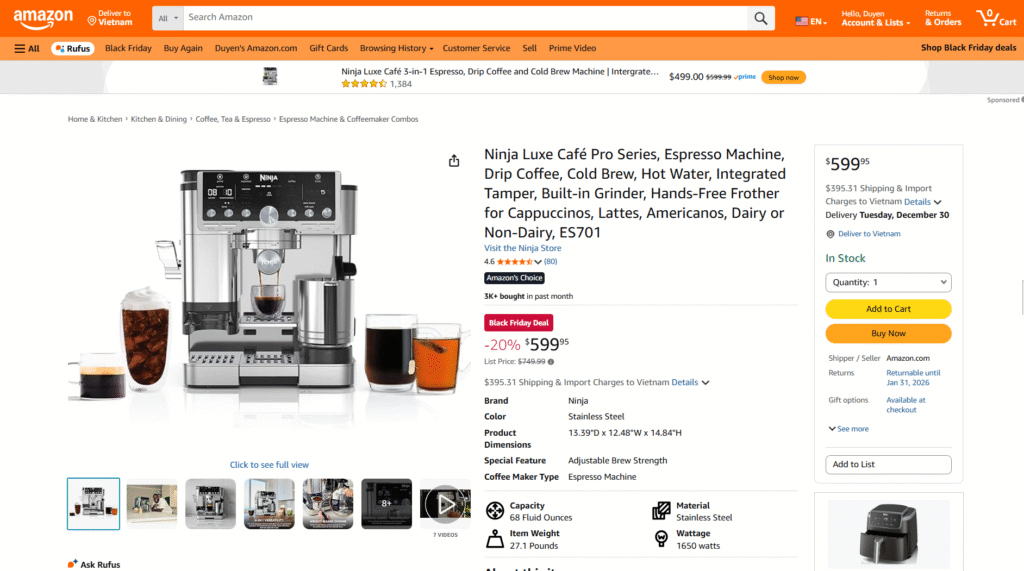
Source: Amazon
The figure “22% of returns are due to the product looking different” emphasizes that expectation mismatches may become expensive returns and loss of trust. Customers will convert better when they know precisely what they are going to get, and the level of dissatisfaction will be reduced.
To produce good quality standard images, it is important to remember to do the following essentials:
- White background with no light patterns.
- Product fills 80-85% of the frame.
- Zoom: resolution of 1500-3000px.
- No actors, no dialogue or unnecessary elements, no distractions.
Clear images of products help customers see the item’s real size, shape, and color. They minimize confusion, gain credibility, and create a sound base on which the later, more creative lifestyle or infographic pictures rely. The initial step toward a credible, conversion-ready listing is a high-quality image.
2. Lifestyle Images
Lifestyle images are where your product stops being “just a product” and starts becoming part of someone’s real life. They help shoppers imagine how your item fits into their daily routine, on their nightstand, in their cozy reading corner, or right next to their bed after a long day. And honestly, isn’t that the moment when people really decide to buy?
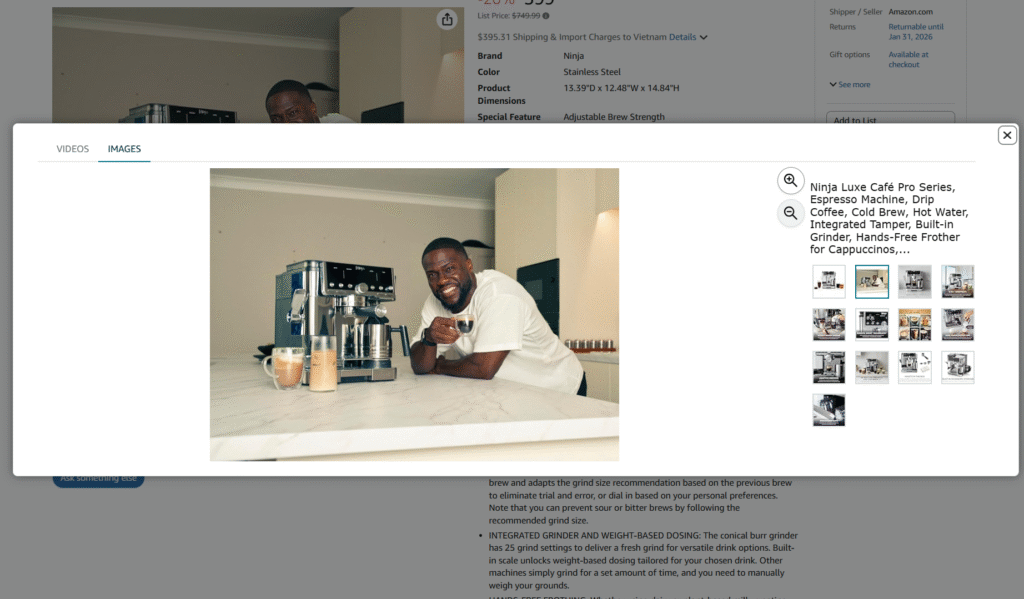
Source: Amazon
When someone scrolls through your listing, lifestyle photos answer the silent questions they already have: “Will this look good in my room? Will it match my vibe? Can I actually picture myself using it?” If your images can make them say “yes,” you’re halfway to the sale.
Great lifestyle photos do more than show a pretty setup; they create a mood. They help shoppers feel something. And that feeling directly shapes whether they add to cart or scroll away.
Here are a few quick things your lifestyle shots should highlight:
- Real-life use in a relatable setting.
- Clear scale so buyers know the true size.
- A consistent aesthetic that matches your brand vibe.
- An emotional appeal that makes viewers imagine ownership.
3. Infographic or Annotation Images
Infographic or annotation images are the fastest way to explain your product without making shoppers read long paragraphs. Instead of leaving people to guess about size, features, or materials, you package everything into a single, clean, easy-to-scan visual. It’s the kind of image that instantly answers the top questions buyers usually have, sometimes even before they realize they were wondering about them.

Source: Amazon
These visuals work especially well when shoppers are comparing multiple products on the same page. A clear infographic shows what makes your item stand out, reducing confusion and hesitation. Think of it as your “5-second pitch”, simple, direct, and impossible to miss.
| IMPORTANT: To make your infographic effective, focus on clarity and simplicity: show the key features, highlight the dimensions, and keep the layout clean so nothing competes for attention. |
4. 360-Degree or Rotatable Images
360-degree or rotatable images give shoppers something they absolutely love: control. Instead of guessing what the back, sides, or hidden angles look like, they can rotate the product freely and explore every detail. It feels interactive, trustworthy, and a lot closer to an in-store experience, something online shopping often struggles to deliver.
When buyers can spin your product, they spend longer engaging with it, and that extra attention often turns into higher confidence… which turns into higher conversion. It also reduces returns because shoppers know exactly what they’re getting. No surprises, no confusion, no “I didn’t realize it looked like this from the side.”
To make these images effective, the rotation should be smooth, well-lit, and consistent across frames. Every angle needs to look clean and accurate if you’re selling decor, lighting, or any product where texture and shape matter; a 360 image can be a game-changer.
5. Comparison Images
Comparison images are essential for helping customers see the differences between product versions, sizes, colors, or features right on the product page. For example, placing two versions of the same bedside lamp side by side instantly shows differences in height, brightness, and design. This reduces surprises and lowers the chance of “buying the wrong one.”
These images also help boost buyer confidence. When shoppers clearly understand what they’re choosing, returns drop. A few tips: always use the same shooting angle, consistent lighting, and highlight the most important differences.
6. Exploded View or Component Images
Comparison images are important for helping shoppers make a confident choice. Have you ever been scrolling through a product listing and wished you could compare two models side-by-side? This is what these pictures do.
You can offer clarity and minimize uncertainty for your customers by displaying related products together or displaying one product in a variety of forms.
The comparison images do not simply reveal size, color, or material but can emphasize important features, differences in performance, or even the contents in packages. Think about displaying a lamp in small and large varieties, or a pillow in soft and firm types, viewers will immediately comprehend which one will work better in their case.
Here’s why they work so well:
- They make the decision-making process quick, and buyers can immediately identify the one they are interested in.
- They minimize post-purchase regret, which translates to fewer returns.
- They highlight improvements or luxury in higher-end models.
- They allow your listing to appear more transparent and trustworthy, which is preferred by customers.
7. How-To or Usage Images
The usage or how-to images help customers understand how a product will fit into their life. Rather than imagining how to use or assemble a product, a shopper will be able to see it in action, whether assembled, styled, or performing its intended purpose.
Such images not only demonstrate but also instill trust. With customers observing the step-by-step use or lifestyle situations, they tend to believe that the product will work for them. Fewer returns often come from less confusion.
As an example, displaying how a fashionable bedside lamp can be incorporated into various room designs, or how an all-in-one pillow can assist in different sleeping positions, can make an enormous difference.
Usage images are most effective when they demonstrate the product in real-life situations and point to its utility. The straightforward and simple visual aids enable customers to visualize themselves using the product instantly, which builds trust and minimizes hesitation at the point of purchase.
The question to ask during the development of such images is: “Does this present the customer with precise details of how to use the product?” If the answer is yes, then it’s a good idea to add a few how-to shots to save headaches, build more confidence, and reduce returns.
Conclusion
Using the right types of images can make a huge difference in reducing returns and building customer trust. From standard product shots to how-to visuals, each type serves a purpose: some clarify, some inspire, and some give shoppers the confidence to hit “Buy” without hesitation. The goal is simple, show your product clearly, honestly, and in ways that help customers make informed decisions.
FAQs
Why do some products get returned even if they look good online?
Often it’s not the product itself, but how it was presented. Images that are unclear, misleading, or incomplete can create unmet expectations, leading to returns.
Which image type is most effective for showing product differences?
Comparison images are perfect for this. They let customers see different sizes, versions, or features side by side, reducing mistakes and post-purchase regret.
How can I make sure customers understand how to use my product?
Use how-to or usage images. Show the product in action or in real-life scenarios, making it easy for shoppers to imagine using it themselves. Clear, step-by-step visuals boost confidence and cut down returns.
Is your main image too small to click?
Measure how much of the frame your product fills against Amazon’s 85% minimum, and how many pixels wide it renders in a phone search result. Free, no sign-up.
Check my main image →